A day in the life of a training designer building interactive 3D — without waiting on specialized simulation teams

Subarna Ganguly Marshall - Unity
Contributor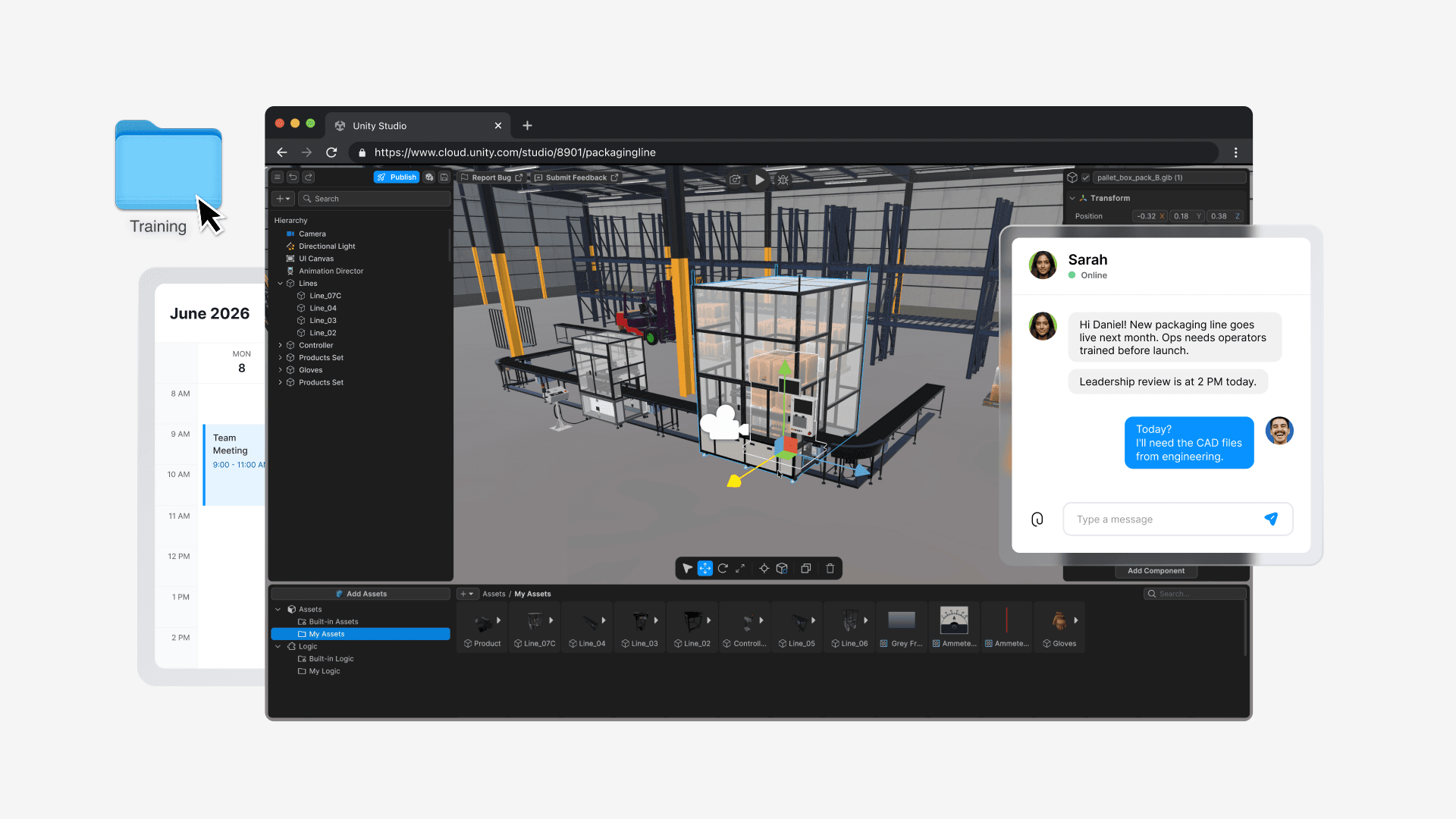
Disclaimer: This story features a fictional persona created for illustrative purposes and does not depict a real customer or individual.
For years, Daniel had the same problem every training designer runs into eventually:
The training worked.But it didn’t stick.
Slides explained the process. Videos demonstrated it. PDFs documented every safety step in painstaking detail. Yet new operators still struggled when they stepped onto the factory floor for the first time.
Because watching a workflow isn’t the same as experiencing it.
Daniel has spent nearly a decade designing training programs for manufacturing teams.
He loves the challenge of helping people learn complex processes quickly and safely. Daniel knew interactive training would make a difference. The problem was getting it built.
He wasn't a simulation developer, nor did he have a dedicated technical team sitting idle waiting for training requests. Creating interactive experiences often meant competing for engineering resources, working with external vendors, or spending weeks building a business case before anyone could even see a prototype.
By the time something was approved, reviewed, revised, and deployed, the process being trained had often evolved.
So most ideas never made it past the whiteboard.
That changed when Daniel started using Unity Studio to create interactive 3D experiences.

Starting a draft in Unity Studio
8:30 AM: Starting with existing 3D assets
Daniel's morning starts with a message from the operations team.
A new packaging line is scheduled to go live next month, and leadership wants operators trained before launch day. The equipment is different from what most employees have used before, and there's pressure to get people up to speed quickly without disrupting production schedules.

Building a hands on interactive training in Unity Studio
In the past, Daniel would have started with a series of planning meetings, screenshots from engineering, and a rough storyboard in PowerPoint. It could take weeks before stakeholders had something tangible to react to.
Now, he opens Unity Studio in his browser and drags and drops existing 3D assets from the company's CAD data into his workspace.
- No learning complex CAD software assets between disconnected tools
- No waiting for engineering support
- No special hardware or software setup required
Within minutes, the packaging line appears as a fully navigable 3D environment. Instead of asking stakeholders to imagine how the training might work, Daniel can begin building around the actual equipment operators will use on day one.

Step-by-step training instructions with Unity Studio
10:00 AM: Turning procedures into hands-on learning
Next, Daniel works on building the training experience itself.
As he considers the workflow, he thinks about where new operators typically struggle.
It's rarely the routine tasks that cause problems. It's the moments when something unexpected happens: a missed safety check, an equipment fault, or a shutdown procedure performed out of sequence.
Those are the situations he wants people to practice before they ever step onto the factory floor.
Using Unity Studio, Daniel begins creating guided training scenarios.
Operators must:
- Inspect the safety latch before startup
- Start the conveyor correctly
- Respond to an equipment fault
- Follow the proper shutdown sequence
Rather than describing these procedures in a slide deck, he can build them into an interactive experience.
He adds prompts that guide learners through each step. Visual cues draw attention to critical controls. Warnings appear when actions happen out of order.
Some scenarios require more than simple instructions.
If a learner skips a safety check, Daniel wants the training to flag the mistake. If equipment is shut down incorrectly, he wants operators to understand the consequences before they encounter the situation in the real world.
Using Unity Studio's visual scripting tools, he can create these interactions without writing code. Through a visual, node-based workflow, he defines what should happen when learners make specific choices or complete specific tasks.
For example:
- If a learner starts the conveyor before completing the safety check, display a warning
- If a fault occurs, guide them through the correct response procedure
- When all required steps are completed correctly, unlock the next stage of the training
- Instead of simply telling operators what to do, Daniel can create opportunities for them to practice decision-making in a safe environment
What previously might have required a specialized simulation team is now something Daniel can prototype himself.
And because learners are actively interacting with the workflow instead of simply reading about it, the training feels much closer to the real-world environment they'll encounter on day one.
For Daniel, that's the goal.
Not just delivering information, but helping people build confidence through practice.

Live feedback and updates in Unity Studio
12:30 PM: Getting feedback before the budget meeting
Before lunch, Daniel shares a browser link with two subject matter experts (SMEs) from the operations team.
The timing matters.
Later that afternoon, he has a review scheduled with leadership, and he'd rather uncover issues now than during a formal approval meeting.
This is normally where projects start to slow down.
In the past, Daniel might have spent weeks gathering requirements and waiting for a prototype before stakeholders had something concrete to react to. Feedback often arrived late, revisions were expensive, and teams found themselves debating how a training experience might work instead of reviewing something tangible.
Today is different.
Within minutes, both SMEs are exploring the experience from their laptops.
As they walk through the workflow, one notices that a safety check is missing before startup. Another points out that operators frequently get confused during an equipment fault and suggests adding additional guidance to that section.
Then comes the kind of feedback every training designer knows well:
"Can we make that change before the leadership review this afternoon?"
A few years ago, that request might have pushed the timeline back days or even weeks.
Instead, Daniel updates the training flow while everyone is still on the call.
The SMEs refresh their browsers and immediately see the revised experience.
- No lengthy handoff process
- No waiting in a production queue
- No trying to explain changes through screenshots and email threads
Just faster iteration, clearer feedback, and greater confidence that the training is heading in the right direction.
2:00 PM: Building confidence across teams
By the afternoon, Daniel has a working prototype ready for leadership review.
And this matters for more than speed alone.
In previous projects, leadership reviews often relied on storyboards, screenshots, and lengthy explanations. Stakeholders would ask questions, make assumptions, and occasionally leave with very different interpretations of how the training experience would actually work.
This time, everyone is looking at the same thing.
Safety leaders explore the startup procedure. Operations managers review the workflow against real-world processes. Training stakeholders experience the module from a learner's perspective.
Instead of debating concepts, they're discussing something tangible.
That shared understanding helps teams identify issues earlier, align more quickly, and make decisions with greater confidence - before expensive rollout mistakes happen.
For Daniel, that's one of the biggest shifts.
The conversation is no longer about imagining what an interactive training experience could be. It's about improving something stakeholders can already see, explore, and react to together.

Updating the experience and publishing
4:00 PM: Getting the training into people’s hands
By the end of the day, Daniel publishes the training experience for pilot teams across multiple regions.
The timing is crucial.
Operators are scheduled to begin training next week, and leadership wants early feedback before the new packaging line goes live.
Because the experience is web-based, there’s no complicated deployment process. Teams can access the training from different locations and devices without waiting for software installations or specialized hardware.
For Daniel, that means the conversation can move from planning to learning much sooner.
And he knows the work isn't finished.
As operators begin using the training, new questions will emerge. Procedures may change. Feedback will inevitably come in. But instead of rebuilding materials from scratch every time something changes, he can update the experience and share revisions quickly.
What once felt like a long production cycle now feels much more iterative and agile - allowing training to keep up alongside the real-world processes it's designed to support.

Starting with Unity Studio
When the people closest to the problem can help build the solution
Daniel's story reflects a challenge many training teams face.
They understand the learning objectives. They know the outcomes the business needs to achieve and the skills employees need to develop.
But turning those ideas into interactive learning experiences has traditionally required specialized workflows, long production cycles, and resources outside their control.
Unity Studio helps change that.
Instead of relying solely on static materials or waiting for complex development processes to begin, training teams can prototype ideas and put experiences in front of operators sooner.
The impact goes beyond creating content faster.
That means less guesswork, faster validation, and greater confidence that the training will be effective in the real world, and not just in theory.
Most importantly, the people who already understand the business problem can participate directly in building the solution.
Because when that happens, training teams stop waiting for someone else to build their ideas. They start testing them, improving them, and putting them into the hands of learners faster.
Disclaimer: This story features a fictional persona created for illustrative purposes and does not depict a real customer or individual.


