The Power of Tools: Building Workflows in Unity with Odin

Andreas Gielov - Sirenix
VP of Marketing at Sirenix
With years of experience in software tooling, the Odin team has made it their mission to improve how all types of developers interact with Unity - streamlining workflows and unlocking new creative potential. In this article, they share what makes a great tool, how to choose the right ones for your business, and why Odin might be one of them.
Software tools are the modern world’s hammers - essential for building, designing, and creating.
From stone tools to digital platforms, tools have always driven human progress. Today, platforms like Unity and Odin continue that tradition, helping creators and businesses do things that once seemed out of reach.
The biggest shift? Powerful tools are no longer just for large enterprises. They’ve been democratized - now accessible to individuals and small teams, fueling rapid innovation across industries.
But in a saturated market with so many options, finding the right tools can be overwhelming and increasingly difficult. In this blog, we’ll look at why tools still matter, what defines a great one, and how the right software can unlock your full potential.
What makes a good tool?
A good tool solves a real problem and gets out of your way. It removes friction, improves efficiency, and helps you stay focused on the work that matters. The best tools are intuitive, reliable, and scale with your needs - they enable you, not slow you down. They should be easy to maintain, and have a purpose that’s crystal clear from the moment you start using them.
Today, nearly every company relies on a suite of software tools. And increasingly, developers are building tools of their own to streamline workflows, automate tasks, or power entirely new systems. Platforms like Unity and Odin make this possible, lowering the barrier to entry for powerful, custom solutions.
“A good tool serves more than one purpose, and Odin has consistently proven its range.”- A1A Software
At Odin, we build tools for making tools, because being able to tailor your own systems is what keeps teams agile in a fast-moving world. From game dev to simulation, the right tools don’t just support work, they unlock what’s next.
One example is A1A Software. Using Unity and Odin, they’ve built custom crane simulation tools that help clients plan complex lifts with precision. We spoke with Jeremy Wolf, Unity Developer at A1A Software, to learn how the right tools are transforming their workflow.
How Unity and Odin empower the creation of tools for crane simulations
Developing lift planning software requires all cranes and objects to be created at runtime. Simulating user input, server responses, and 3D behavior inside Unity is absolutely essential to help companies save time and money. Take, for example, the construction of our physics-based cranes in 3D Lift Vision. A customer begins by navigating to a lift plan, creating a jobsite, and selecting from one of thousands of cranes.
Next, the user loads that lift plan into 3D Lift Vision, which applies joints to all the rigging components and provides a realistic feel for how the load will move during the lift. This is where we faced one of our most challenging moments. We needed tools that would help us do three things:
1. Quickly access crane-level objects
2. Create test joints between GameObjects
3. Iterate through various rigging configurations
Odin Inspector’s toolkit gave us exactly what we needed. With easy-to-create editor scripts, we built customizable inspector windows that included sliders to cycle through rigging styles and buttons to create or recreate joint setups on demand. We no longer have to bind debug functions to runtime hotkeys. Now, we simply add a [Button] attribute above a function, and it appears in the editor, ready to use.
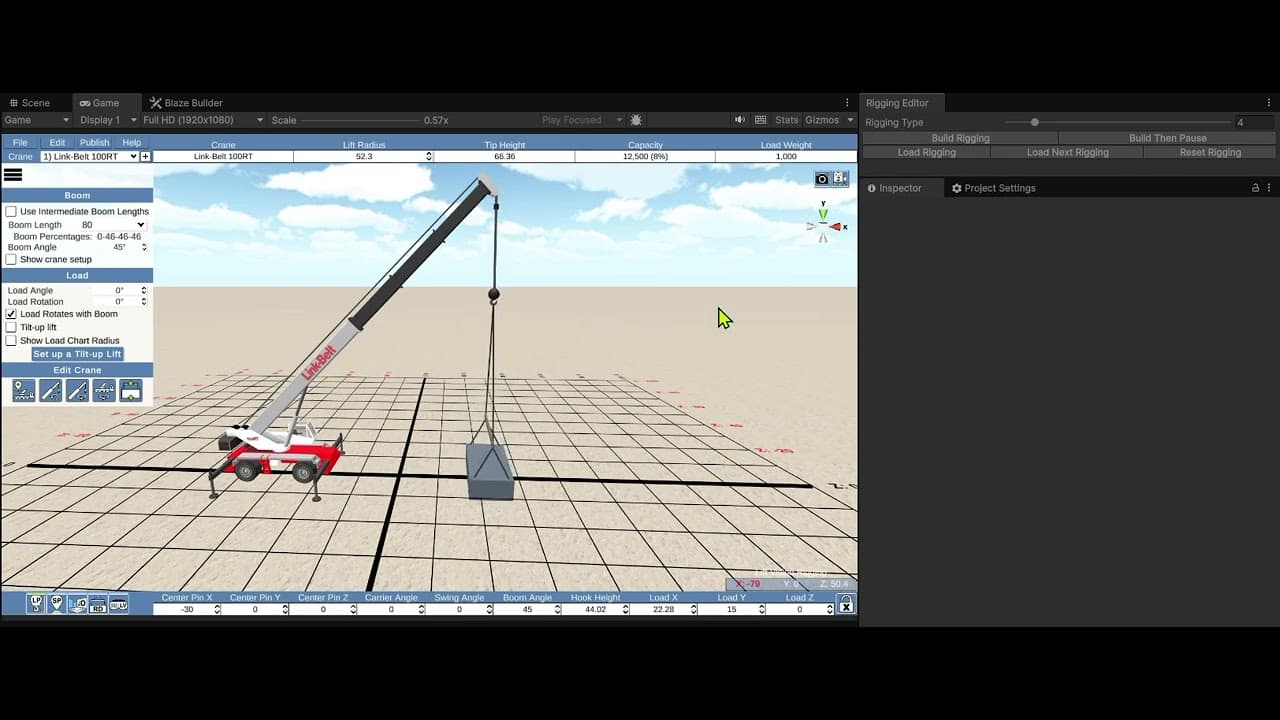
A good tool serves more than one purpose and Odin has consistently proven its range. We’ve used it to build custom windows that allow us to change scenes quickly, perform math calculations on GameObjects, and even convert menu prefabs between UI systems while generating scripts based on the objects in the prefab. What makes Odin especially powerful is that with each new challenge, we discover features that help us solve problems more efficiently.
That kind of flexibility is exactly what makes a great tool: it saves time, improves development flow, and opens the door for creative solutions in places where they were previously too time-consuming to attempt.

Advanced Odin-powered editor windows at A1A support rapid prototyping, in-editor logic testing, and automated UI-to-code workflows.
Odin: Streamline Your Unity Workflow and Build Better Tools
Odin is a suite of tools for Unity that makes it significantly easier and more efficient for developers to customize the Unity editor. By helping teams streamline workflows and tackle challenges that would otherwise be too time-consuming or complex, Odin provides a solid foundation for any project, regardless of the scope.
With Odin Inspector, we enable users to easily create their own tools inside of the Unity Editor, by making it simple and efficient to create custom editors and inspectors tailored specifically to their needs - all without having to write a single line of custom editor code.
In addition, Odin Validator scans your project for issues in the background without ever getting in your way. It works right out of the box, but it is very customizable and lets you bulk-fix thousands of issues with a single click, keeping your project clean, stable, and free of errors, allowing you to move fast without breaking things along the way.
By providing a toolbox for developers that we wished we’d had ourselves when we first started using Unity, Odin has become one of the most popular add-ons for Unity, trusted by Unity developers in all industries around the world.
We have subscribed to what we discussed above about what makes a great tool and Odin is built with this philosophy in mind. We appreciate good tools and it is encouraging to see more industries outside of gaming adopting these tools in such innovative ways.
![[Odin Validator Video]](/_next/image?url=https%3A%2F%2Fimg.youtube.com%2Fvi%2Fvvef8wLJUr8%2Fmaxresdefault.jpg&w=3840&q=75)
Looking Ahead: Unity, Odin, and the Future of Tool Creation
We have appreciated our partnership over the years with Unity. We are confident that Unity will continue to provide a powerful platform to build off of for years to come. At Odin we have a major update coming up that includes the long awaited Odin Visual Designer, allowing you to create custom tools, inspectors and editors without even touching a code editor. We’re also in the very early stages of releasing a brand new UI library, PanGui, to the world, that will ensure our toolbox remains full for developers everywhere.

What you build tomorrow starts with the tools you choose today
Whether it’s a stone to shape an arrowhead, a hammer to forge a sword, or software to build digital products, tools continue being at the core of our ability to create and evolve.
Odin has become a powerful part of the Unity toolbox, helping developers create better, cleaner, and more efficient content than ever before and as we head towards an unpredictable future, tools will remain as vital as they’ve always been. Building and using them will continue to be a fascinating journey - allowing for incredible creations.
But, in a world overflowing with options, it is more important than ever to carefully choose the tools you decide to include in your toolbox, consider why you’re using them and what purpose they are serving.
Let’s connect
We’d love to hear your thoughts. Are you using custom tools in your projects? What challenges are you facing, and how are you approaching tool creation to improve your workflows? Feel free to share your experiences - we’re always interested in learning how others are solving problems in this space. We’re also very happy to answer any questions you might have about Odin.
You can always reach us on our discord channel or at: mail@sirenix.net